
Sign In Start Free Trial
Account

Add to playlist

Create a Playlist

Modal Close icon
You need to login to use this feature.
  • Book Overview & Buying Mastering Windows Server 2019
  • Table Of Contents Toc
Mastering Windows Server 2019

Mastering Windows Server 2019 - Second Edition

By : Jordan Krause
4.3 (45)
close
close
Mastering Windows Server 2019

Mastering Windows Server 2019

4.3 (45)
By: Jordan Krause

Overview of this book

Mastering Windows Server 2019 – Second Edition covers all of the essential information needed to implement and utilize this latest-and-greatest platform as the core of your data center computing needs. You will begin by installing and managing Windows Server 2019, and by clearing up common points of confusion surrounding the versions and licensing of this new product. Centralized management, monitoring, and configuration of servers is key to an efficient IT department, and you will discover multiple methods for quickly managing all of your servers from a single pane of glass. To this end, you will spend time inside Server Manager, PowerShell, and even the new Windows Admin Center, formerly known as Project Honolulu. Even though this book is focused on Windows Server 2019 LTSC, we will still discuss containers and Nano Server, which are more commonly related to the SAC channel of the server platform, for a well-rounded exposition of all aspects of using Windows Server in your environment. We also discuss the various remote access technologies available in this operating system, as well as guidelines for virtualizing your data center with Hyper-V. By the end of this book, you will have all the ammunition required to start planning for, implementing, and managing Windows.
Table of Contents (17 chapters)
close
close
Preface
Who this book is for
What this book covers
To get the most out of this book
Get in touch

Containers and Nano Server

This topic wraps us back around to our discussion about Nano Server and why it has partially disappeared as a Windows Server installation option. Before discussing the purpose that Nano Server now serves, let's take a quick look at the structure of a Windows-based container. Here is a graphic borrowed from a public slide deck that was part of a Microsoft Ignite presentation:
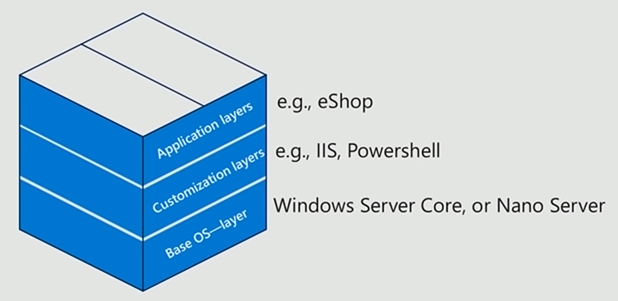
The lowest layer of a container is the base operating system. When spinning up a container, you need a base set of code and kernel from which to build upon. This base operating system can be either Server Core or Nano Server.

The next layer of a container is the customization layer. This is where the technologies that will ultimately be used by your application reside. For example, our containers may include IIS for hosting a website, PowerShell, or even something such as .NET...

CONTINUE READING
83
Tech Concepts
36
Programming languages
73
Tech Tools
Icon Unlimited access to the largest independent learning library in tech of over 8,000 expert-authored tech books and videos.
Icon Innovative learning tools, including AI book assistants, code context explainers, and text-to-speech.
Icon 50+ new titles added per month and exclusive early access to books as they are being written.
Mastering Windows Server 2019
notes
bookmark Notes and Bookmarks search Search in title playlist Add to playlist download Download options font-size Font size

Change the font size

margin-width Margin width

Change margin width

day-mode Day/Sepia/Night Modes

Change background colour

Close icon Search
Country selected

Close icon Your notes and bookmarks

Confirmation

Modal Close icon
claim successful

Buy this book with your credits?

Modal Close icon
Are you sure you want to buy this book with one of your credits?
Close
YES, BUY

Submit Your Feedback

Modal Close icon
Modal Close icon
Modal Close icon