Sign In Start Free Trial
Account

Add to playlist

Create a Playlist

Modal Close icon
You need to login to use this feature.
  • Book Overview & Buying Delphi High Performance
  • Table Of Contents Toc
  • Feedback & Rating feedback
Delphi High Performance

Delphi High Performance

By : Primož Gabrijelčič
4.8 (9)
close
close
Delphi High Performance

Delphi High Performance

4.8 (9)
By: Primož Gabrijelčič

Overview of this book

Delphi is a cross-platform Integrated Development Environment (IDE) that supports rapid application development for Microsoft Windows, Apple Mac OS X, Google Android, iOS, and now Linux with RAD Studio 10.2. This book will be your guide to build efficient high performance applications with Delphi. The book begins by explaining how to find performance bottlenecks and apply the correct algorithm to fix them. It will teach you how to improve your algorithms before taking you through parallel programming. You’ll then explore various tools to build highly concurrent applications. After that, you’ll delve into improving the performance of your code and master cross-platform RTL improvements. Finally, we’ll go through memory management with Delphi and you’ll see how to leverage several external libraries to write better performing programs. By the end of the book, you’ll have the knowledge to create high performance applications with Delphi.
Table of Contents (16 chapters)
close
close
Title Page
Copyright and Credits
Packt Upsell
Contributors
Preface
2
Index

Delphi compiler settings


First things first—before you start meddling with the code, you should check the Delphi compiler settings for your project. In some situations, they can affect the code speed quite a lot.

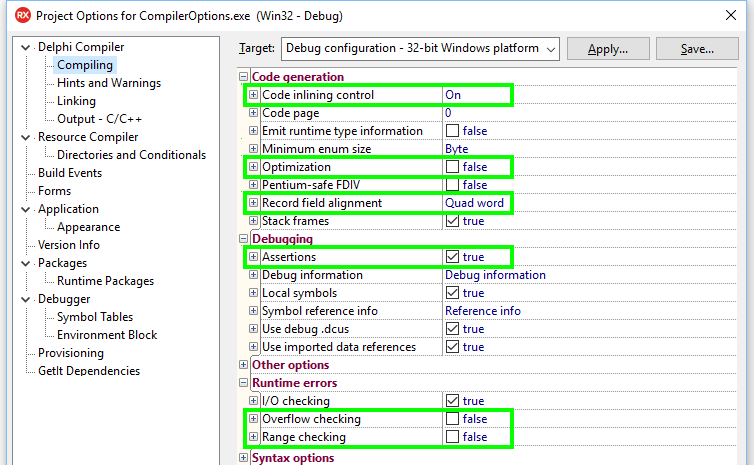
To check and possibly change compiler settings, open your project, then select Project | Options from the menu or press Ctrl + Shift + F11. Relevant options can be found in the branch Delphi Compiler | Compiling, as shown in the following screenshot here:

Compiler settings that influence program speed

We will look into the following options:

  • Code inlining control
  • Optimization
  • Record field alignment
  • Assertions
  • Overflow checking
  • Range checking

All of these settings can be enabled/disabled for the complete project and they can also be turned on/off in the code by using compiler directives (comments that start with {$).

Code inlining control

We will look into the concept of code inlining later in this chapter, in the section, Optimizing method calls, so this text will serve just as an introduction...

Limited Time Offer

$10p/m for 3 months

Get online access to our library of over 7000 practical eBooks and videos, constantly updated with the latest in tech and supported with AI assistants
notes
bookmark Notes and Bookmarks search Search in title playlist Add to playlist download Download options font-size Font size

Change the font size

margin-width Margin width

Change margin width

day-mode Day/Sepia/Night Modes

Change background colour

Close icon Search
Country selected

Close icon Your notes and bookmarks

Confirmation

Modal Close icon
claim successful

Buy this book with your credits?

Modal Close icon
Are you sure you want to buy this book with one of your credits?
Close
YES, BUY

Submit Your Feedback

Modal Close icon
Modal Close icon
Modal Close icon