-
Book Overview & Buying
-
Table Of Contents
-
Feedback & Rating
Drupal 8 Development Cookbook - Second Edition
By :
Drupal 8 provides more functionality out-of-the-box than previous versions of Drupal, allowing you to do more with less. However, one of the more appealing aspects of Drupal is the ability to extend and customize.
In this recipe, we will download and enable the Honeypot module (https://www.drupal.org/project/honeypot) and tell Drupal to use the Bootstrap theme (https://www.drupal.org/project/bootstrap). The Honeypot module provides Honeypot and timestamps antispam measures on Drupal sites. This module helps protect forms from spam submissions. The Bootstrap theme implements the Bootstrap frontend framework and supports using Bootswatch styles to theme your Drupal site.
This chapter's recipe will use the standard way of installing modules, by downloading archives available on Drupal.org. As of Drupal 8.2.0, installing modules through Composer has been possible and is the required method for some modules. Installing modules and themes using Composer is covered in the There's more... section of this recipe and is highly recommended.
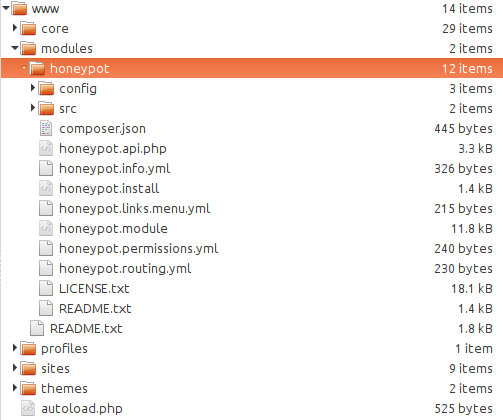
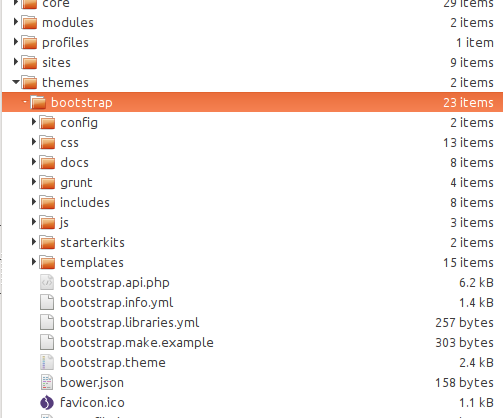
If you have used Drupal before, note that the folder structure has changed. Modules, themes, and profiles are now placed in their respective folders in the root directory and no longer under sites/all. For more information about the developer experience change, refer to https://www.drupal.org/node/22336.
Downloading the example code: You can download the example code files for all Packt books you have purchased from your account at http://www.packtpub.com. If you have purchased this book from elsewhere, you can go to http://www.packtpub.com/support and register yourself to have the files emailed directly to you.
Let's install modules and themes:
honeypot folder inside the modules folder, which is inside of your Drupal core installation:
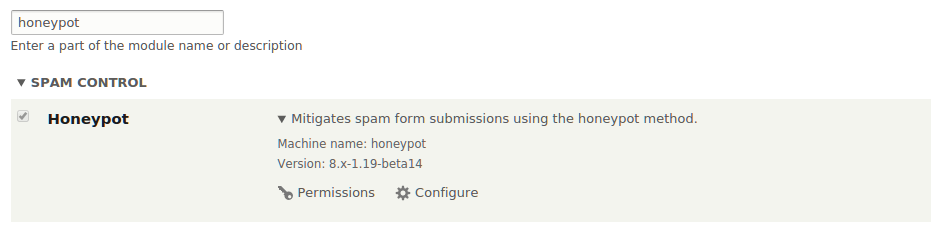
Extend option to access the list of available modules.Honeypot. Check the checkbox and click on Install.

bootstrap folder inside the themes folder, which is inside your Drupal core installation:
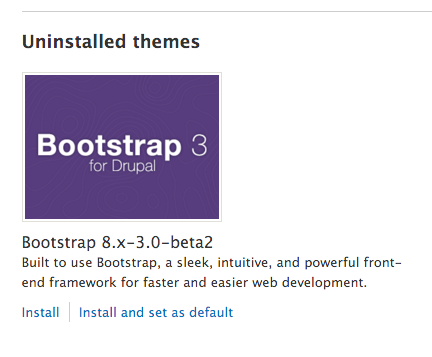
Appearance option to manage your Drupal themes.Install and set as default under Bootstrap to enable and set the theme as default:
The following sections outline the procedure for installing a module or theme and how Drupal discovers these extensions.
Drupal scans specific folder locations to identify modules and themes defined by the .info.yml file in their directory. The following is the order in which projects will be discovered:
modules or themes folderBy placing the module inside the root modules folder, we are allowing Drupal to discover the module and allow it to be installed. When a module is installed, Drupal will register its code with the system through the module_installer service. The service will check for required dependencies and prompt them to be enabled if required. The configuration system will run any configuration definitions provided by the module on installation. If there are conflicting configuration items, the module will not be installed.
A theme is installed through the theme_installer service and sets any default configuration by the theme along with rebuilding the theme registry. Setting a theme to default is a configuration change in system.theme.default to the theme's machine name (in the recipe, it would be bootstrap).
The following section outlines the procedure for installing a module or theme and includes some additional information for installing.
Although it is not the required way to install an extension, this should become your default method. Why? Because each module is a dependency in your project, and each of those may have its own dependencies. Composer can manage dependencies for you, or you can manage them manually. Your time and capabilities probably will not grow to scale as well as Composer will. Not to mention, it also provides a standard way for PHP projects to interoperate and load classes.
You can get the Honeypot module and Bootstrap using the following two commands:
$ cd /path/to/drupal8 $ composer require drupal/honeypot$ composer require drupal/bootstrap
Here is an example of contributed projects, which require Composer for installation, because they leverage existing libraries in the PHP community at large:
As more and more modules integrate existing SDK libraries, the requirement to use Composer will increase.
Modules can be downloaded and enabled through the command line using drush. The command to replicate the recipe would resemble the following:
$ drush pm-download honeypot$ drush pm-enable honeypot
As of Drush 9, which supports Drupal 8.3+, this section is deprecated. Using Drush to download Drupal core or contributed modules will throw a warning to use Composer instead.
It will prompt you to confirm your action. If there were dependencies for the module, it would ask whether you will like to enable those, too.
Drush simply downloads the archive available from Drupal.org. If the module or theme requires third-party PHP library dependencies, these will not be downloaded or be available in Drupal's class autoloading process.
One of the substantial changes in Drupal 8 is the module disable and uninstall process. Previously, modules were first disabled and then uninstalled once disabled. This created a confusing process, which would disable its features, but not clean up any database schema changes. In Drupal 8, modules cannot just be disabled but must be uninstalled. This ensures that when a module is uninstalled it can safely be removed from the code base.
A module can only be uninstalled if it is not a dependency of another module or does not have a configuration item in use--such as a field type--which could disrupt the installation's integrity.
With a standard installation, the Comment module cannot be uninstalled until you delete all the Comment fields on the article content type. This is because the field type is in use.
Change the font size
Change margin width
Change background colour